In short
- The problem
- AI assistants are built for one person, so teams screen-share, paste answers into chat and lose who asked what and why.
- What I did
- Answered four questions group AI chats leave open: whose context counts, who can prompt, who clears a warning and what the room keeps. Then I built a working prototype with six team scenarios.
- The trade-off
- A little setup in every new room, accepted so that nobody’s personal history reaches colleagues by default.
- Status
- A concept I reviewed and revised myself. It has not been tested with real teams.
Self-directed concept with no client. Claude Rooms is my own concept and is not affiliated with or endorsed by Anthropic.
Contents
In an ordinary group chat, Sam sounding sure is enough to make the caution disappear. In Rooms the flag stays until someone resolves it by name.
AI assistants are built for one person, and most work involves several
I kept hitting the same wall. Two of us needed the model in one conversation, so one person drove and the other watched a screen share. Answers got pasted into Slack, where the model could no longer see the discussion that followed. Transcripts got forwarded to people who could read them but not question them.
Each workaround loses something. With a screen share, only one person can prompt. Answers pasted into Slack lose the discussion that follows. A forwarded transcript cannot be questioned.
Group chats with AI have started to arrive. Microsoft launched Copilot Groups in October 2025 and OpenAI added group chats to ChatGPT a month later. Both let several people talk to the model in one thread. Neither settles who is in charge of it.
Who gets to decide what the model knows and says?
Whose personal context enters a shared room? Who may prompt the model and put words in its mouth? What happens to an answer the model is unsure about when someone in the group is sure? What does the room leave behind for later?
Each question has several defensible answers. Choosing between them is the design work, and the screens follow from the choices. I made every one of those choices myself, with no client or team to push back, so I wrote down the argument I would have to make for each.
Existing collaboration patterns only go so far. Google Docs and Figma solved working together on a fixed document. A model answers differently depending on who asks and what it has seen, so those patterns do not carry over.
Nothing personal enters the room unless its owner shares it
| Option | What the room knows | The risk |
|---|---|---|
| Merge everyone’s history | Everything each person has told the model | Private history exposed by default, and noisier answers |
| Start empty | Nothing | Loses the reason the model is useful |
| Opt in per item Chosen | Only what each owner chooses to share | A little setup in every new room |
Merging everyone’s history is what a naive build does, and it fails twice. Someone may have used the model for medical or legal questions, so it exposes private history by default, and unrelated history makes every answer worse.
Starting empty is the safe default, and it is what ChatGPT’s group chats do. It also throws away the reason the model is useful: it knows your situation.
Opting in per item is slower, but it is the only option where nobody’s private history reaches colleagues by default. OpenAI says it is exploring finer memory controls for group chats, which points the same way.
I chose opting in. It adds a little setup to every new room, and I took that over a default that quietly exposes personal history to colleagues, because that mistake cannot be undone.
A warning stays on screen until someone resolves it by name
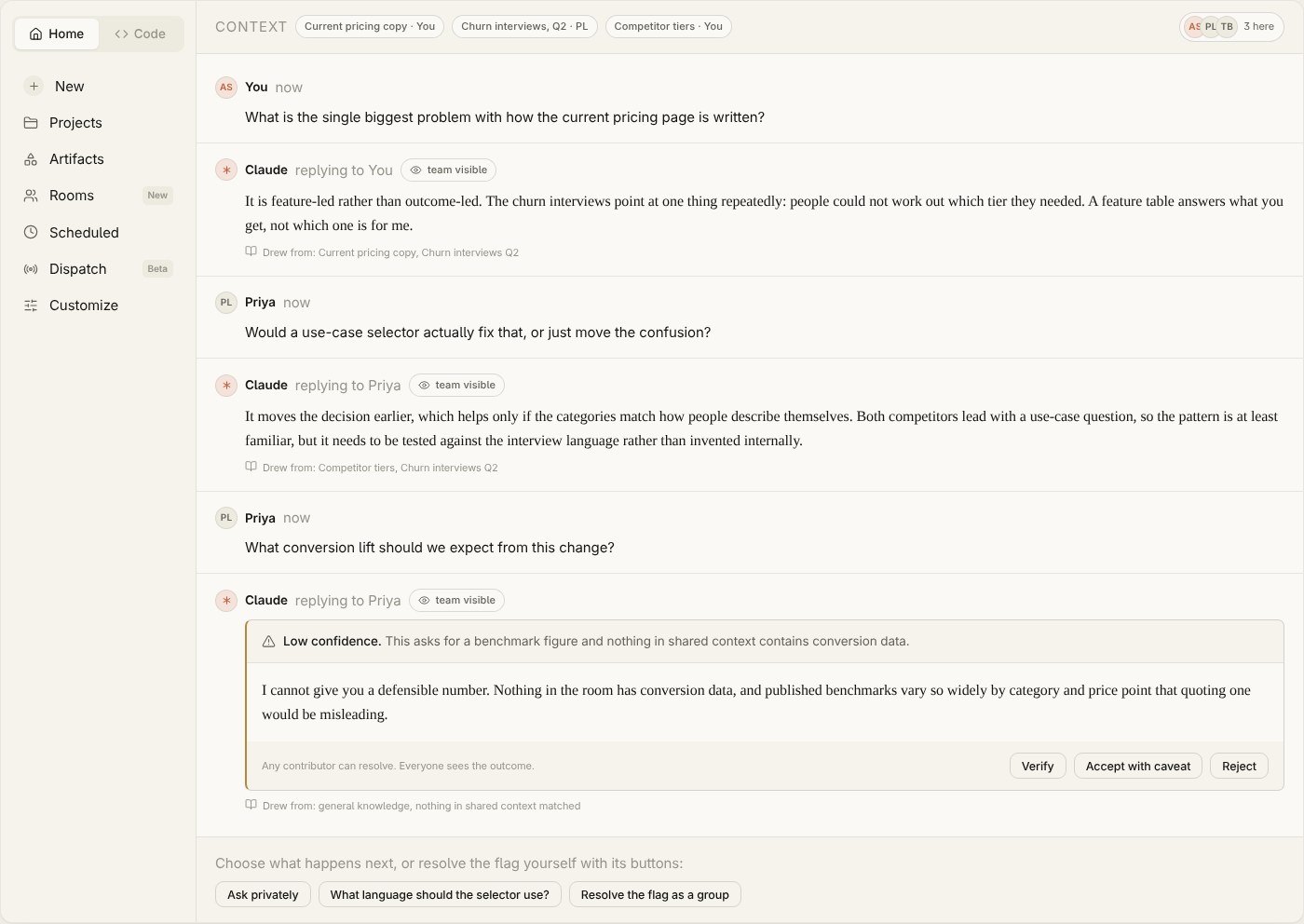
This is the scene you tried at the top of the page, and the decision I would defend hardest.
Alone, you handle a low-confidence answer reasonably: the model flags it, you weigh it and you decide. Put three people around it and the caution gets absorbed by whoever sounds most certain.
So the flag stays until someone marks the answer as verified, accepted with a caveat or rejected. Sounding sure in the chat cannot clear it. The resolution carries a label and a name and stays on the record, so anyone reading later can see how the answer was checked.
Research on correcting AI suggestions points the same way. A study of 2,784 people in the Harvard Data Science Review found that when correcting an AI error took an extra step, people made fewer corrections and accepted more wrong suggestions. People who already trusted automation accepted wrong answers more often than sceptics. In a room, the most trusting person can wave away a caution for everyone, so resolving a flag takes one click and the flag stays in view until someone does.
Roles decide who can prompt, and everyone can still take part
| Can they… | Owner | Contributor | Viewer |
|---|---|---|---|
| Set what the room knows | Yes | No | No |
| Invite people and set roles | Yes | No | No |
| Prompt the model | Yes | Yes | No |
| Add context | Yes | Yes | No |
| Comment and post evidence | Yes | Yes | Yes |
| Resolve a low-confidence flag | Yes | Yes | No |
The prototype opens Rooms from Claude’s own navigation, sets what the room knows, invites people with roles and runs a session where every decision above is used in context.
In the walkthrough, a legal colleague joins as a Viewer and wants to ask a regulatory question. He cannot prompt, so a Contributor asks for him. He still takes full part: he comments, and the document he posts settles the flag. What he cannot do is shape on his own what the model says to everyone else.
 (opens the full-size image)
Every reply is pre-written, and the prototype says so. Live AI replies would feel more real, but they cost money on every visit and can fail in the middle of a demo. Pre-written replies cost nothing to host, so it can stay online indefinitely and every scenario shows every decision, whatever a visitor clicks.
Try the prototypeSix-step tour, then six teams to play with. Works on a phone.
Using it like an impatient visitor changed four things
Before anyone else saw it, I used the prototype the way a busy reviewer would: skimming, clicking ahead and trying to leave.
The tour ran faster than anyone could read. It now has six steps, each waits for you to act before moving on and each has a way out.
The guide card sometimes covered what it was explaining. It now sits beside its target, and on a phone it becomes a sheet at the bottom of the screen.
When the tour ended, there was nothing left to do. Six teams now follow it, from a hiring panel to a board pack, each ending on uncertainty for a different reason.
A Viewer could resolve a flag. That broke the role model the whole concept depends on. Viewers now post evidence, and an Owner or Contributor resolves it.
The same pass caught the intro claiming the replies were live. They were scripted, so it now says so.
What I now check in any AI product
The questions I ask now are who holds authority, what happens when the system is unsure and what the interaction leaves behind for someone to rely on later. It is the same question as my insurance documentation work: what stays on record once the people, or the model’s memory, have gone.
Next time I would put it in front of a real team first
None of these decisions has been tested with a real team yet. The uncertainty flag is designed against a social dynamic, and one afternoon watching three colleagues use it would teach me more than any amount of reasoning.
I would ask for a source when someone verifies. In the prototype, a confident person can still click Verify with nothing attached. Their name goes on the record, which raises the cost of being wrong, but a real version should ask what they checked it against.
And I would design the failure states earlier. I designed what the room looks like when the model is unsure, but not what the group sees when the model errors or stalls, or when someone leaves mid-conversation. Those are the moments a team is most likely to stop trusting it.
Sources: Microsoft Copilot fall release, October 2025; OpenAI, Group chats in ChatGPT, November 2025; Beck, Eckman, Kern and Kreuter, “Bias in the Loop”, Harvard Data Science Review, 2026.
Built in HTML, CSS and JavaScript with AI assistance, on a design system written from scratch.
If this is relevant to a role you are hiring for, I am glad to walk through the prototype and the decisions behind it.